
Free Preview
Bunsen Burner Thermodynamics
Overview The Bunsen Burner Pro Simulator is an interactive virtual laboratory workstation designed to teach laboratory heating fundamentals, combustion chemistry, and flame emiss...
The Bunsen Burner Pro Simulator is an interactive virtual laboratory workstation designed to teach laboratory heating fundamentals, combustion chemistry, and flame emission spectroscopy. Built on an animated HTML5 2D canvas and powered by a real-time Web Audio synthesizer, the software simulates fluid fuel dynamics (methane, CH4), variable aeration (oxygen, O2 premixing), combustion stoichiometry, and thermal heat exchange.
The workstation allows learners to explore distinct flame structures, calibrate primary aeration ratios via a rotating air collar, navigate thermal gradients with a movable thermocouple probe, trigger atomic emission spectra using inorganic metal chloride salts, study convective heat transfer and carbon soot fouling on glass vessels, and safely identify combustion hazards such as strike-back.
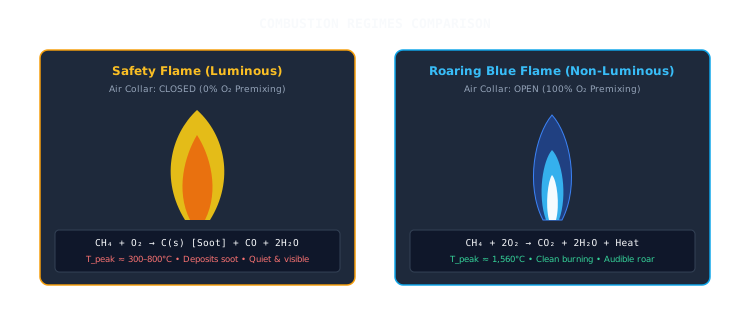
- Combustion Stoichiometry & Aeration: Investigate the relationship between fuel-air premixing ratios, flame morphology (luminous yellow safety flame vs. non-luminous blue flame), enthalpy output, and by-product formation.
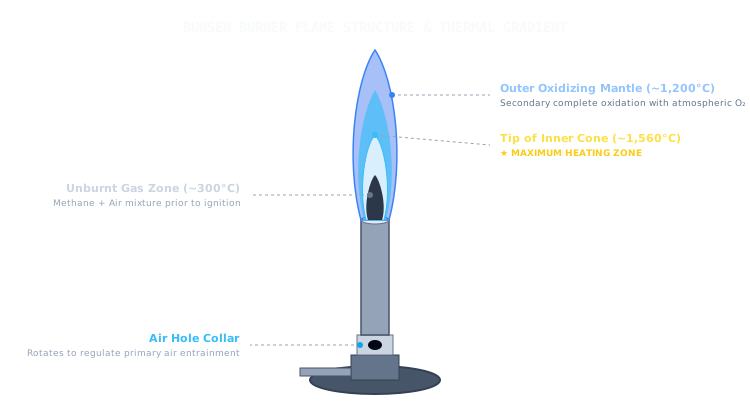
- Thermal Architecture & Zone Mapping: Map temperature gradients across distinct flame regions using a movable digital thermocouple probe to identify the unburnt gas core (~300°C), the tip of the inner cone (~1,560°C, maximum heating zone), and the outer oxidizing mantle (~1,200°C).
- Hazard Identification (Strike-Back / Flashback): Recognize how low fuel feed rates combined with excess primary air drop mixture velocity below flame propagation velocity (vg < Su), inducing internal barrel combustion and emergency shutdown procedures.
- Atomic Emission Spectroscopy: Observe valence electron excitation and subsequent photon emission across group 1 and group 2 metal salts (Cu2+, Na+, K+, Sr2+, Ba2+, Ca2+), correlating flame colors with discrete wavelength bands.
- Thermal Energy Transfer: Quantify heating rates and boiling times for aqueous solutions, evaluating how incomplete combustion soot (C(s)) forms an insulating barrier on glassware.
-
Virtual Bunsen Burner Assembly:
- Adjustable gas needle valve (0–100% flow control)
- Rotatable air collar for primary aeration entrainment (0–100% opening)
- Heavy cast metal base with flexible rubber gas supply tubing
- Cylindrical brass/steel chimney barrel
- Piezoelectric spark ignition mechanism
-
Diagnostic & Thermal Instrumentation:
- Movable digital thermocouple probe (25°C to 1,600°C range)
- Visible emission spectrum line marker (400–700 nm continuum)
- Digital stopwatch and immersion thermometer
-
Chemical Reagents & Testing Tools:
- Nichrome / platinum wire loop with insulated handle
- Dilute hydrochloric acid (HCl) cleaning bath
-
Metal chloride salt rack:
- Copper(II) chloride (CuCl2)
- Sodium chloride (NaCl)
- Potassium chloride (KCl)
- Strontium chloride (SrCl2)
- Barium chloride (BaCl2)
- Calcium chloride (CaCl2)
-
Glassware Heating Rig:
- Laboratory tripod stand
- Ceramic-centered iron wire gauze
- 250 mL borosilicate glass beaker containing 200 mL distilled water
- Verify that the air collar is set to the Closed (0%) position before opening the fuel supply.
- Open the gas needle valve to 40%.
- Click Spark / Ignite to light the burner.
- Observation: A quiet, yellow, luminous Safety Flame forms. Combustion is incomplete because oxygen mixes only at the outer boundary.
- Gradually rotate the air collar to 50% (Gentle Blue), then to 100% (Roaring Blue).
- Observation: The flame becomes non-luminous pale blue and resolves into two distinct zones: a pale blue inner cone and a darker outer mantle, accompanied by an audible combustion roar.
- Enable the Temperature Probe and drag its tip through the vertical flame profile to record local temperatures:
- Base / Unburnt Gas Core: ~280–350°C
- Tip of the Inner Cone: ~1,500–1,560°C (Maximum Heating Zone)
- Outer Oxidizing Mantle: ~1,150–1,250°C
- With the burner lit, rotate the air collar to 100% Open.
- Slowly throttle the gas needle valve down below 15%.
- Observation: When linear gas velocity drops below flame propagation speed (vg < Su), the flame pops, flashes down the chimney, and burns internally at the jet orifice inside the barrel.
- Notice the barrel overheats (turns glowing red) and the STRIKE-BACK HAZARD alert triggers.
- Corrective Action: Immediately close the gas valve to 0% to extinguish the burner and reset the system safely.
- Switch to the Flame Test (Salts) mode.
- Adjust the burner controls to establish a clean, non-luminous blue flame (Gas: ~50%, Air: ~60%).
- Select a metal chloride salt from the rack to coat the nichrome wire loop:
- Copper(II) chloride (CuCl2)
- Sodium chloride (NaCl)
- Potassium chloride (KCl)
- Strontium chloride (SrCl2)
- Barium chloride (BaCl2)
- Calcium chloride (CaCl2)
- Click Insert Wire in Flame.
- Observation: Record the characteristic flame color and note the corresponding dominant emission wavelength marker on the visible spectrum continuum (400–700 nm).
- Click Clean Wire (HCl) to decontaminate the loop before selecting the next metal salt.
- Switch to the Beaker Heating & Soot mode to position the tripod, wire gauze, and water beaker over the burner.
- Trial A (Incomplete Combustion): Close the air collar to 0% (Luminous Safety Flame). Heat the water while tracking temperature rise and bottom surface appearance.
- Observation: Incomplete combustion generates solid carbon particles (C(s)), depositing a black soot layer under the glass that thermally insulates the beaker.
- Click Wipe Soot to clean the beaker base.
- Trial B (Complete Combustion): Open the air collar to 100% (Roaring Blue Flame) and heat the water to boiling (100°C).
- Observation: Compare elapsed times; complete combustion transfers heat significantly faster without depositing carbon soot.
Initializing secure sandbox environment & decrypting simulation...