
Free Preview
Investigating the Simple Pendulum
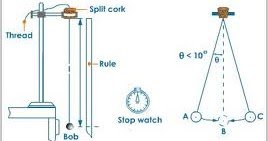
A simple pendulum consists of a small metallic bob suspended by a light, inextensible string from a fixed support. This virtual laboratory allows students to explore the fundamental law...

A simple pendulum consists of a small metallic bob suspended by a light, inextensible string from a fixed support. This virtual laboratory allows students to explore the fundamental laws of a simple pendulum by manipulating the string length and measuring the time taken for a set number of oscillations. The simulator features a real-time physics engine that accurately models gravitational pull and calculates the period (T), allowing students to verify the linear relationship between the length (L) and the square of the time period (T2).
- To study the relationship between the effective length (L) of a simple pendulum and its time period (T).
- To plot an L vs. T curve and an L vs. T2 graph.
- To determine the acceleration due to gravity (g) at a given location.
- To find the length of a Second's Pendulum (a pendulum with a time period of exactly 2 seconds).
- To verify the mathematical formula for the period: $$T = 2rac{ ext{L}}{g}$$
- Virtual Pendulum Setup: Adjustable string and a spherical metallic bob.
- Digital Stopwatch: A precise timer to measure the duration of n oscillations.
- Calibrated Ruler: For measuring the effective length from the point of suspension to the center of the bob.
- Graph Plotter: Real-time generation of L-T and L-T2 data points.
- Setup Configuration: Use the slider to set the Effective Length (L) to 100 cm.
- Timing the Oscillations: Select the number of oscillations (e.g., n=20). Click Measure Time. The digital stopwatch will automatically record the time (t) as the bob completes the selected count.
- Data Logging: Once the measurement is complete, the data is automatically added to the Observation Table. Note the calculated Time Period (T = t/n) and the value of T2.
- Graph Analysis: Observe the L-T Graph (a parabolic curve) and the L-T2 Graph (a straight line).
- Second's Pendulum Identification: Analyze the graphs to find the length where T = 2s (T2 = 4s2). On the L-T2 graph, this corresponds to an effective length of approximately 99.3 cm.
- Calculating g: Use the slope (s) of the L-T2 graph to calculate gravity: $$g = 4rac{ ext{π}}{s}$$
.jpeg)
Initializing secure sandbox environment & decrypting simulation...