
Free Preview
Counter-Flow Double Pipe Heat Exchanger Simulation
A heat exchanger is a specialized device that transfers thermal energy between two or more fluids without mixing them. This virtual lab simulates a Counter-Flow Double Pipe Heat Exchang...

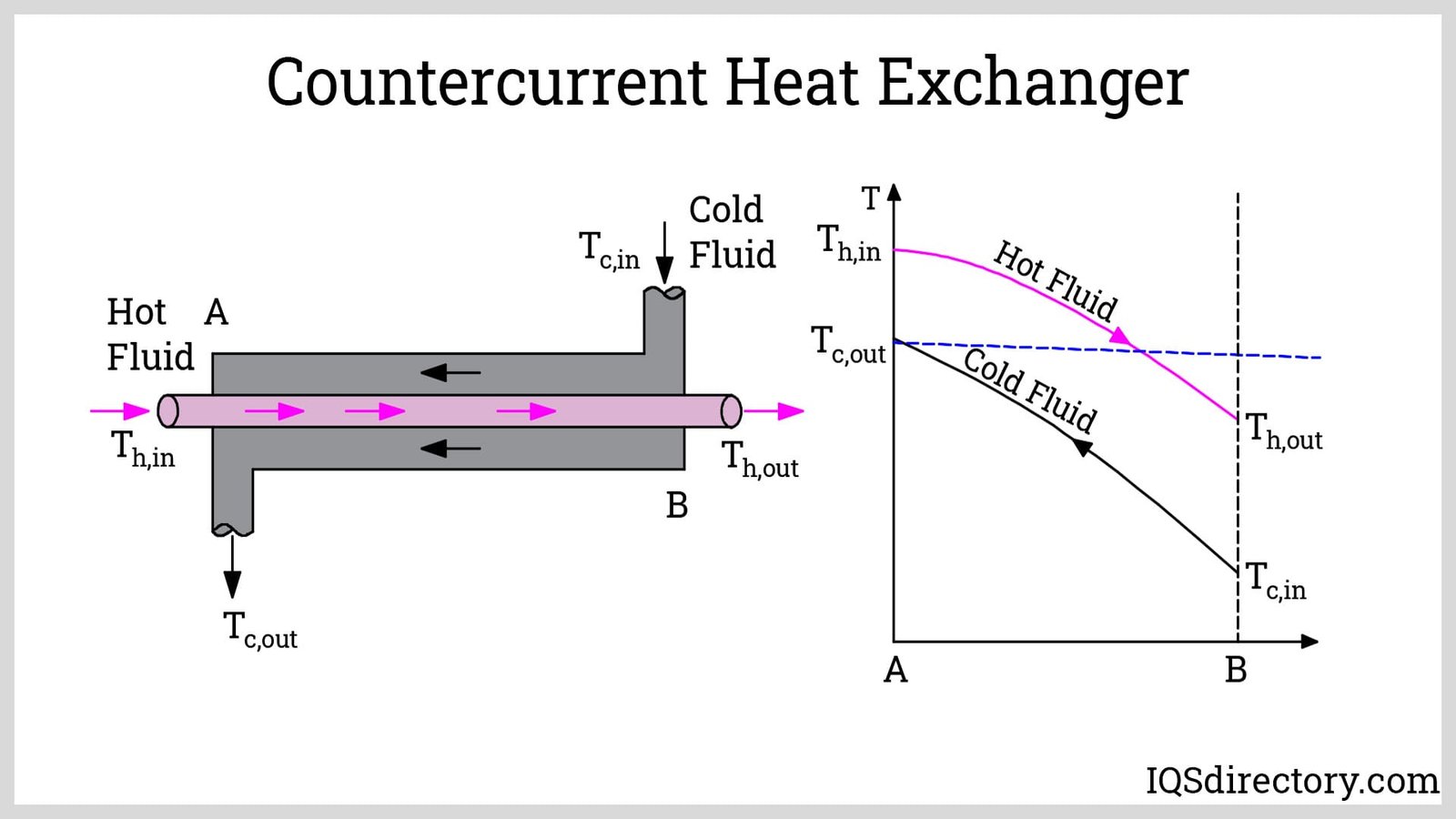
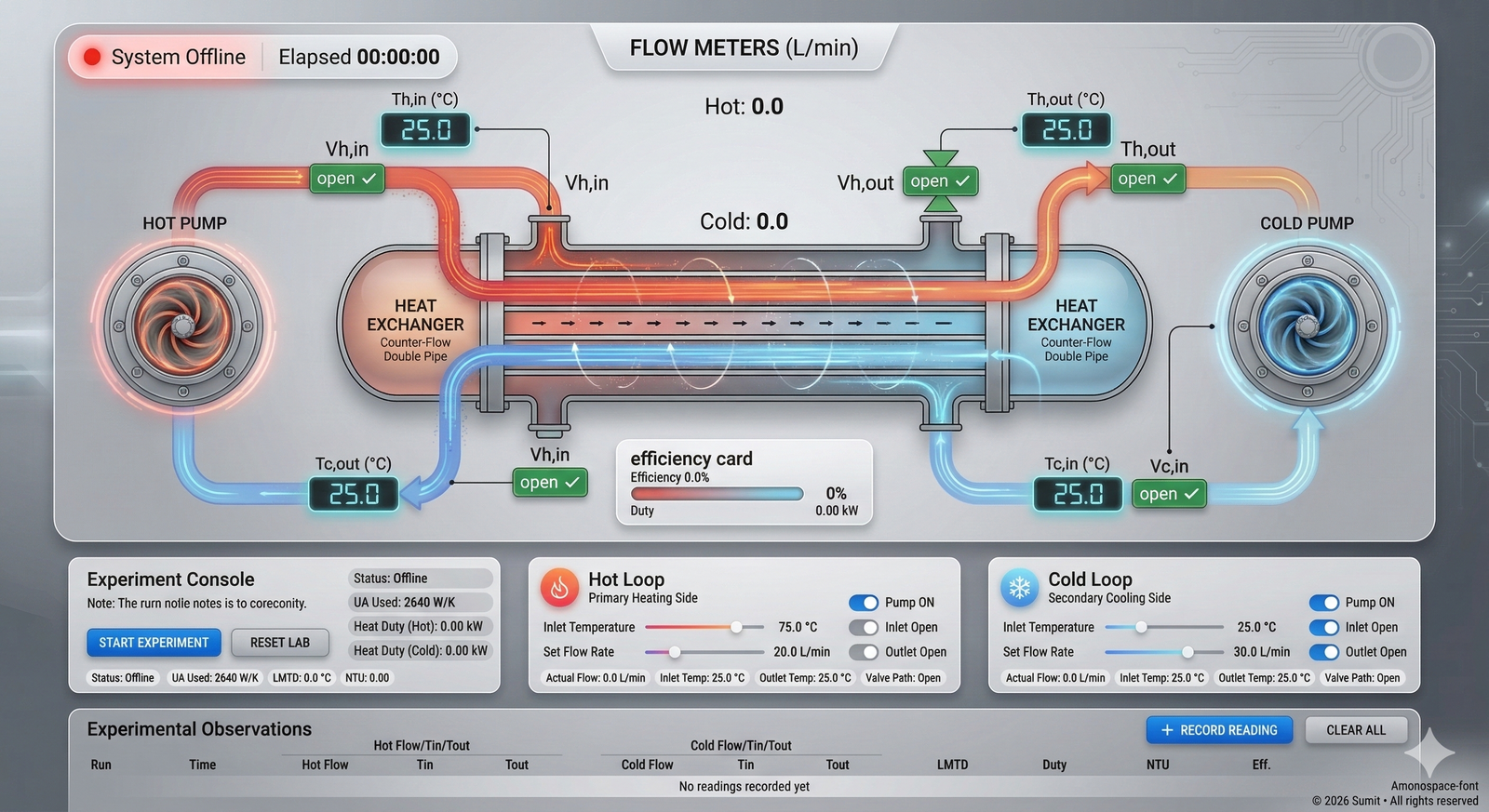
A heat exchanger is a specialized device that transfers thermal energy between two or more fluids without mixing them. This virtual lab simulates a Counter-Flow Double Pipe Heat Exchanger, which is the most efficient configuration for thermal transfer. The interactive schematic visualizes the hot and cold fluid streams, dynamic pump speeds, and real-time temperature differentials. Students can manipulate inlet temperatures and flow rates to observe the impact on the system's overall heat duty and effectiveness.
The objectives of this lab are as follows:
- To observe the operational mechanics of a counter-flow heat exchange system.
- To investigate how altering mass flow rates affects the outlet temperatures of both the hot and cold fluids.
- To calculate and analyze the Log Mean Temperature Difference (LMTD) across varying flow conditions.
- To evaluate the thermal efficiency (Effectiveness, ε) and Number of Transfer Units (NTU) of the exchanger.
Required materials for this lab include:
- Virtual Exchanger Schematic: An interactive double-pipe model with live flow animations.
- Fluid Control Panel: Adjustable sliders for Hot/Cold Inlet Temperatures (Th,in, Tc,in) and Flow Rates.
- Pump & Valve Toggles: Interactive switches to isolate or restrict fluid loops.
- Telemetry Dashboard: Live readouts of Heat Duty (Q), Efficiency (ε), LMTD, and NTU.
- Data Logger: An integrated observation table with CSV export for offline analysis.
The procedure for this lab is as follows:
- Initial State: Set the Hot Inlet to 75°C and Cold Inlet to 25°C. Set the hot flow rate to 20 L/min and cold flow rate to 30 L/min.
- System Activation: Ensure all valves and pumps are toggled "ON," then click START EXPERIMENT.
- Observation: Watch the schematic. Note how the hot fluid cools as it moves right, while the cold fluid (moving left) absorbs the heat.
- Data Collection: Allow the temperatures to stabilize, then click + RECORD READING.
- Variable Testing (Flow Rate): Reduce the Hot Flow rate to 10 L/min while keeping the Cold Flow at 30 L/min. Observe how this affects the Outlet Temperatures (Th,out and Tc,out) and the overall Efficiency. Record this new data point.
- Analysis: Use the exported CSV data to verify the energy balance equation (Qhot ≈ Qcold) and the LMTD calculation:
Initializing secure sandbox environment & decrypting simulation...